Table of Contents
You don’t go to any strangers in the street and start talking to them about your personal life, so why they should be able to see your FB profile? Your Facebook account contains almost all your personal information. So, it’s better to keep your FB account safe to avoid any mishappening.
Facebook is used by almost everyone now-a-days. Even kids are on facebook. Thankfully, Facebook provides a lot of privacy settings to secure your account. Some of them are described here. You can keep your Facebook account secure with these five simple tips:
1. Limit the audience who can see your profile to only your friends
You can do this by following the below given steps
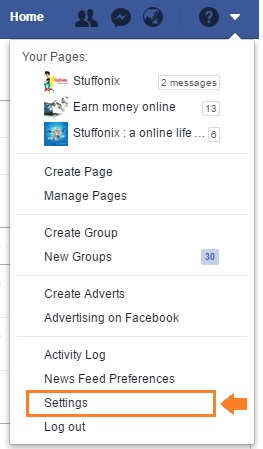
Click on the cog icon in the top right corner of your screen. Then go to Privacy Settings.
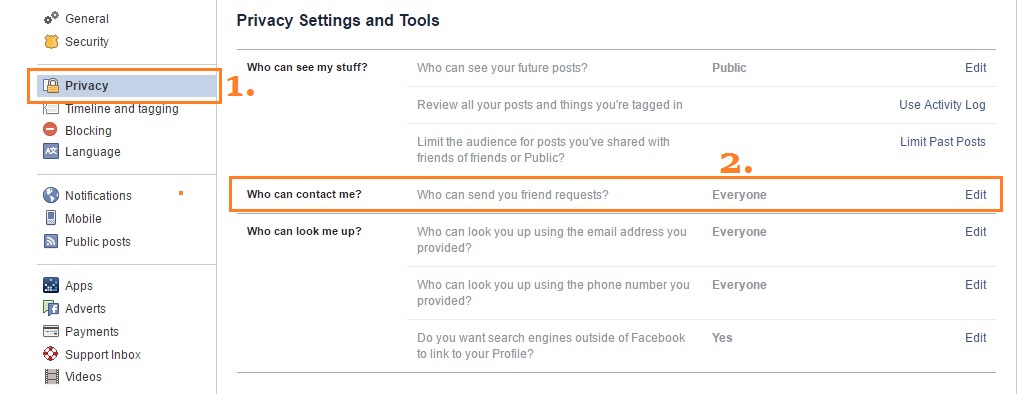
Click on Privacy -the 3rd option down in the left pane. You are now using the �?Privacy Settings and Tools’ of Facebook. Here you will find an option �?Who can see my stuff?’ You can limit the audience who can see your stuff on FB from here.
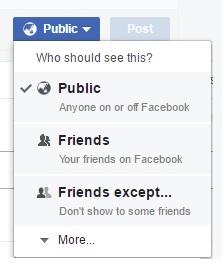
You can choose who you want to see your future updates by going to �?Who can see your future posts?’ You have to choose from: Public , Friends, Only you and Custom
It is recommended not to choose �?Public’ as it means �?everyone’. Choose �?Friends’ to limit your audience to only your FB friends.
You can limit some of your friends from going through your posts by the help of the option �?Custom’.
What you choose will be the default option for your future posts. However you can choose an option individually for any of your old or future posts.
2. Control who can contact you on FB
You can choose who can contact you through same Privacy Settings and Tools which we used above.
This set up by default allows friends and �?people you may know’ to send messages to your inbox.
You can filter on your inbox further if you want only friends can contact you. Messages from other people will be then diverted to �?other’ folder. You can access them from the Messages screen.
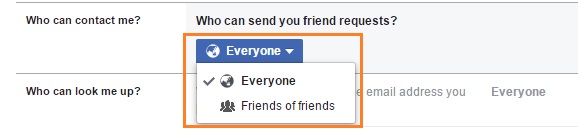
On FB, anyone can send you a request by default. But you can limit it by choosing only friends of your friends.
3. Use Login Approvals
Although keeping the password strong is very important, the two-factor authentication is also essential for the security purpose. This feature is also called as “Login Approvals”. Turning on this feature is a must if you really want to protect your Facebook account.
There is a simple principle behind this feature:
You sign in your account with something you know means the password, and something you have means your phone usually. When you enter the password, Facebook sends a code to your phone that you have to type in on the site. This is to confirm that the person who is logging in is really you so that if someone finds out or know your password by chance, he/she still won’t be able to sign in without the help of your phone. The code can be obtained as a text message or through an authentication app on the phone like ?Authy’ or ? Google Authenticator’.
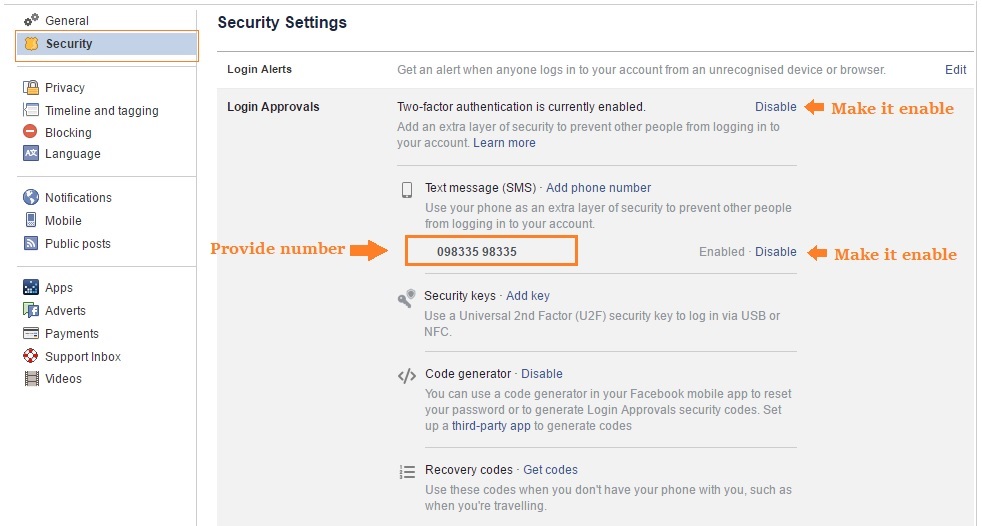
You can enable this feature called “Login Approvals” from going to Settings > Security > Login Approvals. You have to check the box which is next to �?Require a login code to access my account from unknown browsers.’
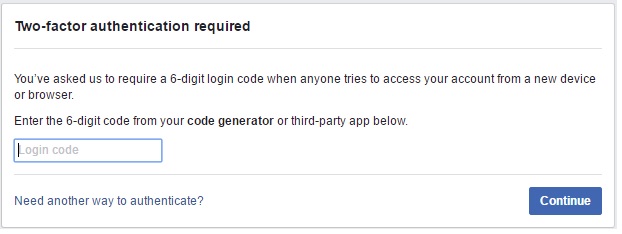
Now when you will log in again, you have to enter the code sent to your phone:
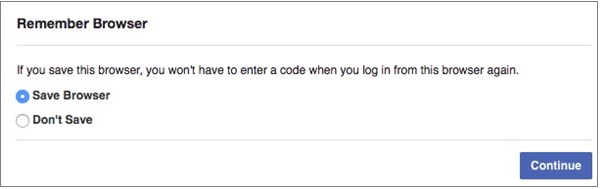
When you enter the code, you are asked whether to store that browser so that there will be no need of the approval code when you will log in from that browser next time.
You can disable this feature any time from? Login Approvals Settings’. But it is strongly recommended not to disable it. Just get used to it to keep your Facebook account secure.
4. Enable Login Alerts
Though keeping your passwords strong and enabling �?Login Approvals’ are really essential to help your account to be secured yet there are some other methods you can use to secure your FB account. Enabling �?Login Alerts’ is one of the such methods. You can enable it from Settings > Security > Login Alerts.
If anyone tries to log in your account from any unrecognized browser or device, you will get a notification as a text message or over email.
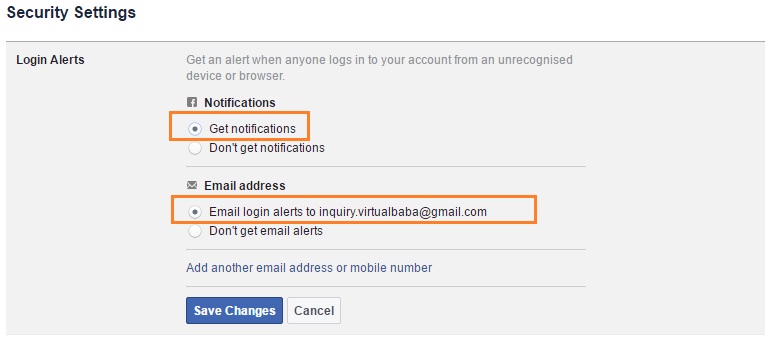
You can add mobile number also to get alert on login.
5. Use the feature Where You’re Logged In’
You can also know which devices are logged into your FB account. If you find any unrecognizable devices, then they can be logged out distantly.
There are chances you won’t find any unrecognizable device, but it is always good to be secure when it comes to your personal account.
For this, Go to Settings > Security > Where You’re Logged In. Now tap “End Activity” if there are any unrecognizable locations or devices. You don’t want to go through and review every session on the list, Just click on “End All Activity” if you don’t want to go and review each of the session of the list. This will log out your account from all the devices in the list.
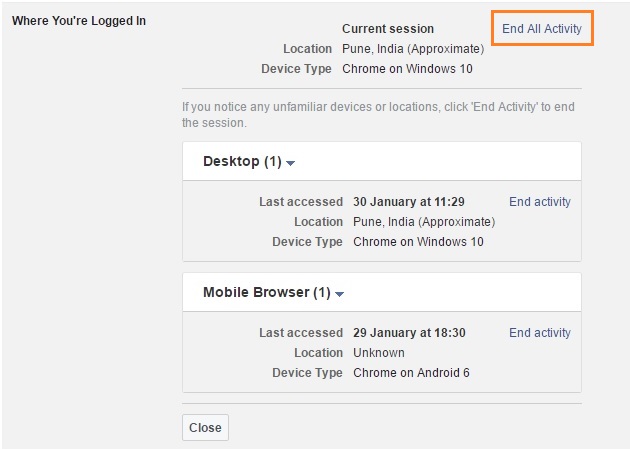
You don’t have to save any changes with this step once an activity is ended for a session.
In case you are logged out from a session, you will still be able to log in from that device without entering the Login Approval code.
You can also cancel the access for any Login Approvals.
For example, if your phone or laptop is stolen, then just go to Security settings>“Recognized Devices”. From here, remove any device or browser or you have approved previously and tap “Save Changes”.
If anyone will try to log into your account from the device he/she will be asked to enter a Login Approval Code’ again.
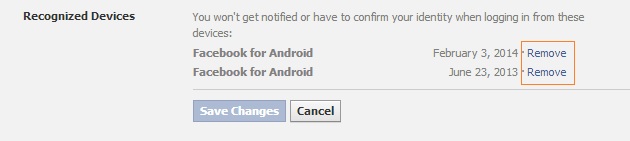
In this way, your FB account will still be secured if your device is stolen.